Intel N100 Mini PC Builds: The Best Value Homelab Servers in 2026
The Intel N100 changed what a homelab can be. For under $150, you get a quad-core processor with integrated graphics, hardware AES encryption, Intel Quick Sync for video transcoding, and a TDP of just 6 watts. A complete mini PC with 16 GB of RAM, a 500 GB NVMe SSD, and a case smaller than a paperback book draws 8-12 watts under typical homelab loads. That is less than a light bulb, and it runs 24/7 for about $1.50 per month in electricity.
Photo by Andrey Matveev on Unsplash
The N100 is not a powerhouse. It will not replace a dual-Xeon server running 50 containers and a dozen VMs. But for the vast majority of homelab use cases — Docker host, Pi-hole, Home Assistant, reverse proxy, lightweight NAS, media server, VPN endpoint — it is more than enough, and it does it silently, cheaply, and reliably.
N100 Specifications
The Intel N100 is an Alder Lake-N processor from Intel's efficiency-focused lineup (no P-cores, all E-cores). Here are the specs that matter for homelab use:
| Specification | Intel N100 |
|---|---|
| Architecture | Alder Lake-N (12th Gen) |
| Cores / Threads | 4 / 4 |
| Base Clock | 1.0 GHz |
| Boost Clock | 3.4 GHz |
| L3 Cache | 6 MB |
| TDP (PBP) | 6W |
| Max Turbo Power | 25W |
| iGPU | Intel UHD Graphics (24 EU) |
| Memory Support | DDR4-3200 / DDR5-4800, single channel |
| Max Memory | 16 GB (officially), 32 GB in some boards |
| PCIe Lanes | 9 (PCIe 3.0) |
| AES-NI | Yes |
| Quick Sync | Yes (AV1 decode, HEVC encode/decode) |
Why It Took Over the Homelab Community
Three things made the N100 the default homelab recommendation:
Power efficiency: A used Dell R720 idles at 120-200W. An N100 mini PC idles at 6-10W. Over a year, the R720 costs $168-280 in electricity (at $0.16/kWh). The N100 costs $8-14. The electricity savings alone pay for the mini PC within a few months.
Silence: N100 mini PCs are either passively cooled (fanless) or use a small, low-RPM fan that is inaudible from more than a foot away. You can put one in your living room, bedroom, or office without hearing it. A rack server in the same room is a non-starter for most living situations.
Quick Sync: Intel's hardware video encoding and decoding engine handles H.264, H.265/HEVC, VP9, and AV1 decode in hardware. For Plex or Jellyfin transcoding, this means the N100 can transcode 3-4 simultaneous 1080p streams using almost no CPU. This single feature makes the N100 more capable as a media server than CPUs with four times the core count but no Quick Sync.
Recommended Mini PCs
The N100 appears in dozens of mini PC models. These are the ones that have proven reliable in the homelab community.
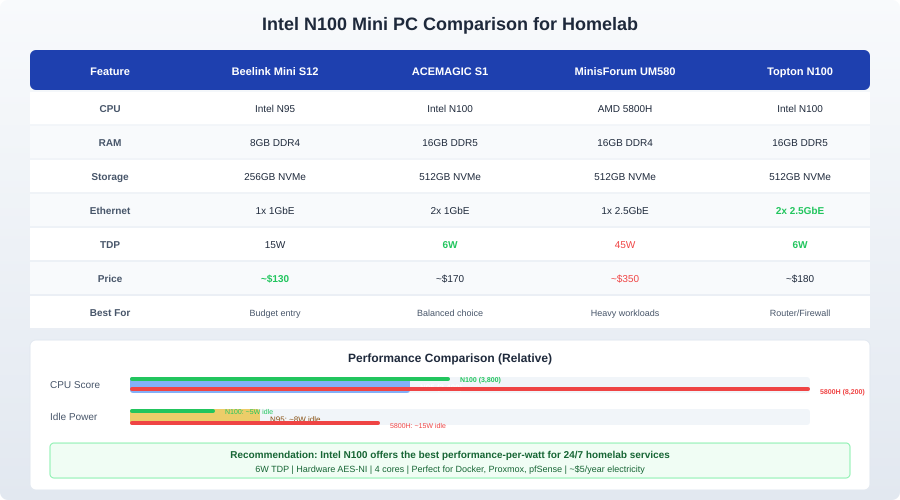
Beelink Mini S12 Pro / EQ12
Price: $130-170 (16GB/500GB configurations frequently on sale)
The Beelink S12 Pro is the volume pick. It ships with 16 GB DDR5 RAM and a 500 GB NVMe SSD, has dual Ethernet (2.5 GbE on some models), dual HDMI output, and a compact aluminum chassis with active cooling.
Pros: Widely available on Amazon, good thermals, active community of homelab users reporting compatibility with Proxmox and various Linux distributions. Cons: Single RAM slot (no dual-channel), 2.5 GbE only on the Pro/EQ12 models (the base S12 has 1 GbE).
The EQ12 variant adds a second 2.5 GbE port, which makes it suitable as a firewall or router running OPNsense or pfSense.
MinisForum UM350 / UN100D
Price: $140-180
MinisForum's N100 offerings tend to have better build quality than Beelink, with a slightly larger chassis that allows for better thermals and an additional 2.5-inch SATA bay for extra storage.
Pros: Extra SATA bay for a 2.5" SSD or HDD, USB-C port, generally solid build quality. Cons: Slightly more expensive than Beelink for similar specs. The extra SATA bay adds bulk.
The 2.5-inch bay makes the MinisForum models particularly good for NAS use cases where you want a small amount of local storage beyond the NVMe drive.
GEEKOM Mini IT12
Price: $160-200
GEEKOM sits at the higher end of the N100 mini PC market, with a focus on build quality and port selection. The IT12 includes USB4/Thunderbolt support on some SKUs, which opens up eGPU and high-speed external storage options.
Pros: Premium build, USB4 on select models, Wi-Fi 6E included. Cons: More expensive than alternatives with similar core specs. Overkill for purely headless homelab use.
Topton N100 Boards (Bare Metal)
Price: $80-120 (board only, from AliExpress)
If you want to build custom — especially for a multi-NIC router or firewall — Topton N100 boards on AliExpress come with 4x 2.5 GbE Intel i226-V NICs. You provide RAM, storage, and a case.
Pros: Four Intel 2.5 GbE ports (perfect for OPNsense/pfSense), cheapest option, available in mini-ITX form factors. Cons: Longer shipping times, no warranty support, requires assembling yourself. Some boards have BIOS quirks that require community workarounds.
These boards are the go-to recommendation for anyone building a dedicated homelab router. Four 2.5 GbE ports on a 6W processor is remarkable value.
CWWK N100 Firewall Appliances
Price: $120-180
Similar to Topton but pre-assembled, CWWK sells ready-to-go N100 appliances with 4-6 Intel NICs in compact fanless cases. They ship from China with typical AliExpress timelines.
Pros: Fanless, multiple Intel NICs, pre-assembled. Cons: AliExpress sourcing, limited support.
Performance Benchmarks
Real-world homelab benchmarks matter more than synthetic scores. Here is what the N100 delivers in practical use:
Docker Container Density
A 16 GB N100 comfortably runs 15-25 lightweight containers simultaneously:
- Pi-hole, Unbound, Traefik, Portainer, Home Assistant, Mosquitto, Zigbee2MQTT, Node-RED, Grafana, InfluxDB, Uptime Kuma, Vaultwarden, Paperless-ngx, Gitea, and Watchtower
- Total idle RAM usage: ~6-8 GB
- Total idle CPU: 3-8%
Adding heavier workloads (Nextcloud with active file syncing, Immich with background ML processing) pushes CPU usage higher but remains manageable for a single user or small household.
Plex / Jellyfin Transcoding
Using Intel Quick Sync hardware transcoding:
- 1x 4K HEVC to 1080p: ~5% CPU, GPU handles it entirely
- 3x 1080p H.264 transcodes: ~10% CPU
- 4x simultaneous streams: Starts hitting limits; occasional buffering on the 4th stream
- Direct play (no transcoding): Essentially free, limited only by network bandwidth
For comparison, software-only transcoding of a single 4K HEVC stream would peg the N100 at 100% CPU and still stutter.
Proxmox Virtualization
The N100 runs Proxmox well for light VM workloads:
- 2-3 lightweight VMs (Ubuntu Server, Alpine, etc.) with 2-4 GB RAM each
- Container-based workloads (LXC) are more memory-efficient than full VMs
- Nested virtualization works but cuts performance significantly
The limitation is RAM, not CPU. With 16 GB total (and Proxmox itself using 1-2 GB), you have 14 GB for VMs. This is fine for 2-3 small VMs or 5-8 LXC containers.
NAS Performance
As a NAS, the N100 handles:
- SMB file serving: Saturates 2.5 GbE (~280 MB/s) without breaking a sweat
- ZFS with 2-drive mirror: CPU overhead is minimal for normal file operations; scrubs and resilvers push CPU to 30-50%
- Rsync backups: AES-NI hardware acceleration means encrypted rsync barely touches the CPU
Want more hardware guides? Get guides like this in your inbox — HomeLab Starter delivers one free deep-dive every week.
RAM and Storage Considerations
RAM
The N100 officially supports up to 16 GB in a single SODIMM slot (DDR4 or DDR5 depending on the board). Some boards accept 32 GB modules despite Intel's official specification — check community reports for your specific model before buying.
- 8 GB: Minimum viable for a Docker host with lightweight containers. You will run out quickly if you add services.
- 16 GB: The sweet spot. Enough for 20+ containers, a couple of VMs, or a NAS with ZFS (which loves RAM for its ARC cache).
- 32 GB: If your board supports it, worthwhile for Proxmox with multiple VMs or ZFS with large datasets.
Buy the largest module your board supports. Single-channel memory is the N100's main performance limitation, and you cannot add a second stick later.
Storage
Most N100 mini PCs have one M.2 NVMe slot and (sometimes) a 2.5-inch SATA bay.
For a Docker host or Proxmox node: A single 500 GB or 1 TB NVMe SSD is sufficient. Pick a drive with good endurance ratings (TBW) since containers and VMs write frequently. The WD Blue SN580 and Samsung 870 EVO (SATA) are reliable budget picks.
For NAS use: The single internal drive is a limitation. Options:
- Use USB 3.0 external drives (acceptable for cold storage, not for primary NAS use due to USB overhead)
- Use the 2.5-inch SATA bay (if available) for a second drive in a mirror
- Connect a USB 3.0 multi-bay enclosure (RAID handled in software via ZFS or mdadm)
- For serious NAS workloads, consider a dedicated NAS box instead
Boot drive: If you are running Proxmox, a small (128-256 GB) NVMe boot drive with a USB-attached HDD array for bulk storage is a common pattern.
Use Cases and Build Recommendations
Docker Host (Most Popular)
Hardware: Beelink Mini S12 Pro, 16 GB RAM, 500 GB NVMe OS: Debian 12 or Ubuntu Server 24.04 Cost: ~$150 total Power draw: 8-10W idle, 15-20W under load
Install Docker and Docker Compose, deploy your services, and forget about it. This is the most common N100 homelab build because it covers 80% of use cases at minimal cost and complexity.
Proxmox Virtualization Host
Hardware: MinisForum UN100D, 16-32 GB RAM (if supported), 512 GB NVMe OS: Proxmox VE 8.x Cost: ~$170 total Power draw: 10-12W idle, 20-25W under load
Good for running 2-3 VMs or 5-8 LXC containers. For a three-node Proxmox cluster (high availability, live migration), buy three identical N100 mini PCs. Three N100s at 10W each (30W total) use less power than a single used rack server.
Home Router / Firewall
Hardware: Topton 4x 2.5GbE N100 board, 8 GB RAM, 128 GB NVMe, fanless case OS: OPNsense or pfSense Cost: ~$120-150 total (board + RAM + SSD + case) Power draw: 6-8W
The four Intel i226-V NICs give you WAN, LAN, IoT VLAN, and a management port. IDS/IPS (Suricata) runs at 2.5 Gbps with minimal CPU impact. This replaces a consumer router entirely and gives you enterprise-grade firewall capabilities.
Lightweight NAS
Hardware: MinisForum with 2.5" bay, 16 GB RAM, 256 GB NVMe boot + 2-4 TB 2.5" SATA data OS: Debian with OpenMediaVault, or TrueNAS SCALE Cost: ~$200 total (including data drive) Power draw: 8-12W
For a single-user NAS with a few terabytes of storage, this works well. ZFS mirror with two drives (one internal, one USB 3.0) provides redundancy. For anything larger, a dedicated NAS chassis (Synology, TrueNAS Mini) with multiple drive bays is a better fit.
Media Server
Hardware: Beelink EQ12, 16 GB RAM, 1 TB NVMe OS: Debian with Docker, running Jellyfin or Plex Cost: ~$160 total Power draw: 8-10W idle, 15-20W during transcoding
Quick Sync handles 3-4 simultaneous transcodes. Store your media library on a NAS and mount it via NFS. The N100 handles the transcoding while the NAS handles storage — each doing what it does best.
Power Consumption Deep Dive
Real-world measurements from the homelab community, measured at the wall with a Kill-A-Watt:
| Scenario | Power Draw |
|---|---|
| Off (standby) | 0.5-1W |
| Idle, no load | 6-8W |
| Light Docker workload (10 containers) | 8-10W |
| Moderate load (containers + transcoding) | 15-20W |
| Full CPU stress test | 22-28W |
| With USB drives attached | +3-5W each |
Annual electricity cost at $0.16/kWh:
- Idle (8W): $11.22/year ($0.94/month)
- Typical load (12W): $16.82/year ($1.40/month)
- Heavy load (20W): $28.03/year ($2.34/month)
Compare this to a Dell PowerEdge R720 at 150W idle: $210.24/year ($17.52/month). The N100 pays for itself in electricity savings within 8-10 months.
Limitations and When to Choose Something Else
The N100 is not the right choice for every workload.
Single-threaded CPU performance: The E-cores are efficient but not fast. Workloads that need high single-threaded performance (some database queries, compilation, game servers) will feel sluggish.
RAM ceiling: 16 GB (or 32 GB on some boards) is the hard limit. If you need 64+ GB for ZFS, databases, or many VMs, look at used workstations (Dell OptiPlex Micro, Lenovo ThinkCentre) with 12th/13th gen i5 processors.
Storage expansion: One NVMe slot and maybe one SATA bay. For a multi-drive NAS, the N100 mini PC form factor is wrong. Use a dedicated NAS chassis.
GPU compute: The integrated GPU handles Quick Sync transcoding, but it cannot run CUDA/OpenCL workloads. For Frigate NVR with TensorRT, LLM inference, or other GPU-accelerated tasks, you need a dedicated GPU.
For most homelabbers starting out or looking to reduce power consumption, the N100 is the answer. Buy one, install Debian or Proxmox, deploy your services, and enjoy a homelab that costs less per month in electricity than a cup of coffee.