
Alertmanager Setup for Homelab: Get Notified When Things Break
Monitoring is useless if nobody sees the alerts. You can have Prometheus collecting beautiful metrics from every system, but if an alert fires at 3am and it only shows in a dashboard you check once a week, something will stay broken longer than it needs to.
Photo by Claudio Schwarz on Unsplash
Alertmanager is the component in the Prometheus stack that handles alert routing and delivery. It receives alerts from Prometheus, deduplicates them, groups related alerts, and sends notifications to wherever you're actually looking — Slack, Discord, PagerDuty, email, or a custom webhook.
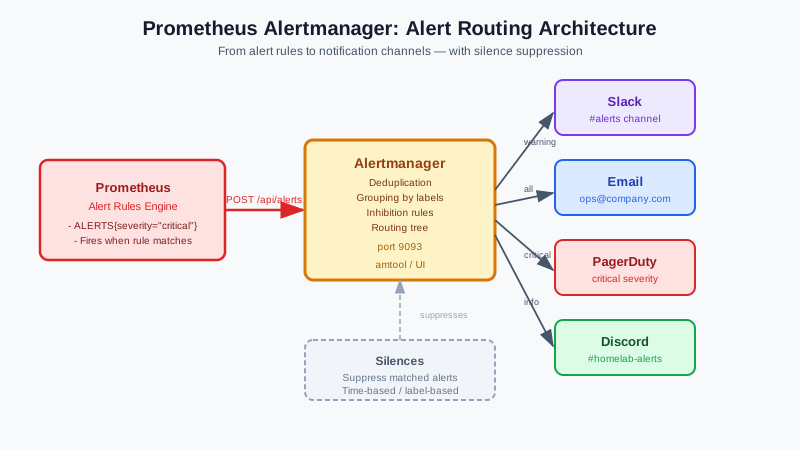
Architecture
Prometheus → AlertManager → Receivers
    ↑                            ↓
  Scrapers               Slack, Email, Discord
                         PagerDuty, Webhooks
Prometheus evaluates alerting rules continuously. When a condition is met for the configured duration, Prometheus fires an alert to Alertmanager. Alertmanager:
- Deduplicates: If the same alert fires 100 times, you get one notification
- Groups: Related alerts can be grouped into one notification
- Routes: Different alert types can go to different destinations
- Silences: Suppress alerts during maintenance windows
Installation
Docker Compose
# alertmanager in your monitoring stack
services:
  alertmanager:
    image: prom/alertmanager:latest
    volumes:
      - ./alertmanager.yml:/etc/alertmanager/alertmanager.yml
      - alertmanager-data:/alertmanager
    command:
      - '--config.file=/etc/alertmanager/alertmanager.yml'
      - '--storage.path=/alertmanager'
      - '--web.external-url=https://alertmanager.yourdomain.com'
    ports:
      - "9093:9093"
    restart: unless-stopped

volumes:
  alertmanager-data:
Connect Prometheus to Alertmanager
In prometheus.yml:
alerting:
  alertmanagers:
    - static_configs:
        - targets:
          - alertmanager:9093  # Docker service name if using Compose

# Load alert rule files
rule_files:
  - /etc/prometheus/rules/*.yml
Basic Configuration
alertmanager.yml structure:
global:
  resolve_timeout: 5m

route:
  group_by: ['alertname', 'cluster']
  group_wait: 30s      # Wait before sending grouped alert
  group_interval: 5m   # Interval between sending updates
  repeat_interval: 4h  # Resend if still firing
  receiver: 'default'

  routes:
    - match:
        severity: critical
      receiver: 'pagerduty'
    - match:
        severity: warning
      receiver: 'slack'

receivers:
  - name: 'default'
    slack_configs:
      - api_url: 'https://hooks.slack.com/services/...'
        channel: '#homelab-alerts'

  - name: 'slack'
    slack_configs:
      - api_url: 'https://hooks.slack.com/services/...'
        channel: '#homelab-alerts'
        title: '{{ range .Alerts }}{{ .Annotations.summary }}{{ end }}'
        text: '{{ range .Alerts }}{{ .Annotations.description }}{{ end }}'

  - name: 'pagerduty'
    pagerduty_configs:
      - routing_key: 'your-pagerduty-key'

inhibit_rules:
  - source_match:
      severity: 'critical'
    target_match:
      severity: 'warning'
    equal: ['alertname']
Want more monitoring guides? Get guides like this in your inbox — HomeLab Starter delivers one free deep-dive every week.
Notification Receivers
Slack
receivers:
  - name: 'slack'
    slack_configs:
      - api_url: 'https://hooks.slack.com/services/T00000000/B00000000/XXXXXXXX'
        channel: '#homelab-alerts'
        send_resolved: true
        title: |-
          [{{ .Status | toUpper }}{{ if eq .Status "firing" }}:{{ .Alerts.Firing | len }}{{ end }}] {{ .CommonLabels.alertname }}
        text: >-
          {{ range .Alerts }}
          *Alert:* {{ .Annotations.summary }} - `{{ .Labels.severity }}`
          *Description:* {{ .Annotations.description }}
          *Details:*
          {{ range .Labels.SortedPairs }} • *{{ .Name }}:* `{{ .Value }}`
          {{ end }}
          {{ end }}
Discord
Discord uses webhooks compatible with Slack format:
receivers:
  - name: 'discord'
    slack_configs:
      - api_url: 'https://discord.com/api/webhooks/YOUR_ID/YOUR_TOKEN/slack'
        channel: '#homelab-alerts'
        send_resolved: true
Note: Use the /slack suffix on Discord webhook URLs to use Slack-compatible format.
global:
  smtp_smarthost: 'smtp.gmail.com:587'
  smtp_from: '[email protected]'
  smtp_auth_username: '[email protected]'
  smtp_auth_password: 'your-app-password'  # Use app password, not account password
  smtp_require_tls: true

receivers:
  - name: 'email'
    email_configs:
      - to: '[email protected]'
        send_resolved: true
        headers:
          subject: '[{{ .Status | toUpper }}] {{ .CommonLabels.alertname }}'
PagerDuty (for critical homelab systems)
receivers:
  - name: 'critical'
    pagerduty_configs:
      - routing_key: 'your-pagerduty-integration-key'
        description: '{{ range .Alerts }}{{ .Annotations.summary }}{{ end }}'
        details:
          firing: '{{ .Alerts.Firing | len }}'
          resolved: '{{ .Alerts.Resolved | len }}'
ntfy (self-hosted push notifications)
If you're running ntfy:
receivers:
  - name: 'ntfy'
    webhook_configs:
      - url: 'https://ntfy.yourdomain.com'
        http_config:
          basic_auth:
            username: 'your-username'
            password: 'your-password'
Writing Alert Rules
Alert rules live in Prometheus, not Alertmanager. Create them in /etc/prometheus/rules/:
Node health alerts
# /etc/prometheus/rules/node.yml
groups:
  - name: node_alerts
    rules:
      - alert: HighCPUUsage
        expr: 100 - (avg by (instance) (irate(node_cpu_seconds_total{mode="idle"}[5m])) * 100) > 90
        for: 10m
        labels:
          severity: warning
        annotations:
          summary: "High CPU usage on {{ $labels.instance }}"
          description: "CPU usage is {{ $value | printf \"%.1f\" }}% on {{ $labels.instance }}"

      - alert: HighMemoryUsage
        expr: (1 - (node_memory_MemAvailable_bytes / node_memory_MemTotal_bytes)) * 100 > 90
        for: 5m
        labels:
          severity: warning
        annotations:
          summary: "High memory usage on {{ $labels.instance }}"
          description: "Memory usage is {{ $value | printf \"%.1f\" }}% on {{ $labels.instance }}"

      - alert: DiskSpaceLow
        expr: (1 - (node_filesystem_avail_bytes{fstype!="tmpfs"} / node_filesystem_size_bytes{fstype!="tmpfs"})) * 100 > 85
        for: 15m
        labels:
          severity: warning
        annotations:
          summary: "Disk space low on {{ $labels.instance }}"
          description: "Disk {{ $labels.mountpoint }} is {{ $value | printf \"%.1f\" }}% full on {{ $labels.instance }}"

      - alert: NodeDown
        expr: up == 0
        for: 3m
        labels:
          severity: critical
        annotations:
          summary: "Node {{ $labels.instance }} is down"
          description: "Prometheus cannot scrape {{ $labels.instance }}"
Docker/container alerts
groups:
  - name: container_alerts
    rules:
      - alert: ContainerDown
        expr: count by (name) (container_last_seen{name!=""}) == 0
        for: 2m
        labels:
          severity: critical
        annotations:
          summary: "Container {{ $labels.name }} is down"

      - alert: ContainerHighCPU
        expr: rate(container_cpu_usage_seconds_total{name!=""}[5m]) * 100 > 80
        for: 5m
        labels:
          severity: warning
        annotations:
          summary: "Container {{ $labels.name }} high CPU"
          description: "Container CPU usage: {{ $value | printf \"%.1f\" }}%"
Silences: Planned Maintenance
When doing maintenance, silence alerts to avoid notification floods:
- Open Alertmanager UI (
http://alertmanager:9093) - Click New Silence
- Set matchers (e.g.,
instance=~"homeserver.*"to silence all alerts from homeserver) - Set duration
- Add a comment explaining why
Or via CLI:
amtool silence add --alertmanager.url=http://localhost:9093 \
  alertname=NodeDown \
  instance=homeserver.local \
  --duration=2h \
  --comment="Maintenance window"
Inhibition Rules
Inhibition prevents noisy follow-on alerts when a root cause alert is firing. Example: if NodeDown is firing, suppress DiskSpaceLow, HighCPUUsage, etc. for that node — they're all symptoms of the same outage.
inhibit_rules:
  - source_match:
      alertname: NodeDown
    target_match_re:
      alertname: '(HighCPU|DiskSpace|HighMemory).*'
    equal: ['instance']
Routing with Multiple Teams
For a homelab with separate notification preferences per alert type:
route:
  receiver: 'default'
  routes:
    # Critical infra: wake me up immediately
    - match:
        severity: critical
        category: infra
      receiver: 'pagerduty'
      continue: true  # Also send to Slack

    # Database alerts: Slack only
    - match:
        category: database
      receiver: 'slack-database'

    # Everything else: general Slack channel
    - match:
        severity: warning
      receiver: 'slack-general'
Testing Alerts
Send a test alert to verify your configuration:
# Using amtool
amtool --alertmanager.url=http://localhost:9093 alert add \
  alertname=TestAlert \
  severity=warning \
  instance=test.local \
  --annotation=summary="This is a test alert" \
  --annotation=description="Testing Alertmanager configuration"

# Verify it appeared
amtool --alertmanager.url=http://localhost:9093 alert query
Or curl directly:
curl -X POST http://localhost:9093/api/v2/alerts \
  -H 'Content-Type: application/json' \
  -d '[{
    "labels": {"alertname": "TestAlert", "severity": "warning"},
    "annotations": {"summary": "Test alert", "description": "Testing config"}
  }]'